Thursday, June 11, 2026

Improving Governance Visibility in Oracle EDM with Approval and Commit Policy Filtering


One of the most overlooked challenges in metadata governance isn't workflow design—it's workflow visibility.

Oracle Enterprise Data Management (EDM) provides robust governance capabilities that allow organizations to define Approval Policies and Commit Policies across Applications, Hierarchy Sets, and Node Types. These capabilities help ensure that metadata changes follow established governance processes before they are committed to downstream systems.


https://community.oracle.com/customerconnect/discussion/964165/add-request-filtering-by-approval-and-commit-policy


However, as organizations scale their governance programs, a common operational challenge begins to emerge:

How do governance teams quickly identify every request currently waiting on a specific approval or commit policy?

Today, the answer is often far more difficult than it should be.

Governance Is More Than Individual Approvals

In many EDM implementations, policies are not assigned to individual users. Instead, they are assigned to governance groups such as:

  • Finance Data Stewards

  • Product Master Governance

  • Enterprise Data Governance

  • Regional Data Owners

  • Corporate Accounting

This approach makes sense because governance responsibilities are typically shared across teams rather than tied to a single individual.

The problem is that while EDM allows users to filter requests by Application, Viewpoint, Request Owner, and Request ID, it does not currently provide a way to filter requests based on the Approval Policy or Commit Policy currently processing the request.

As a result, governance administrators often find themselves manually reviewing workflow details to answer relatively simple questions.

Questions such as:

  • What requests are waiting for Finance Data Steward Approval?

  • Which governance group currently has the largest backlog?

  • Are any approval policies becoming workflow bottlenecks?

  • How many requests are awaiting commit approval before month-end processing?

These are operational governance questions that should be easy to answer.

A Real-World Governance Scenario

Consider an organization that maintains a policy called:

Finance Data Steward Approval

This policy is responsible for reviewing chart of accounts changes, cost center updates, and financial hierarchy modifications.

Throughout the month, requests are submitted from multiple business units and routed through various workflow paths. Some requests reach the Finance Data Steward Approval stage immediately, while others arrive later after passing through multiple governance checkpoints.

A governance lead wants visibility into all requests currently waiting for action from the Finance Data Steward team.

Today, that visibility does not exist through a simple filter.

Instead, administrators must manually investigate individual requests, review workflow histories, or navigate multiple screens to understand current workload and request status.

As request volumes increase, this process becomes increasingly inefficient.

Why Policy-Based Filtering Matters

Adding Approval Policy and Commit Policy as standard request filters would provide immediate value to governance teams.

With policy-based filtering, users could:

  • View all requests awaiting a specific approval policy

  • View all requests awaiting a specific commit policy

  • Combine policy filters with existing request criteria

  • Monitor workload across governance teams

  • Identify approval bottlenecks before service levels are impacted

More importantly, governance visibility would shift from reactive investigation to proactive management.

Instead of searching for problems, governance teams could immediately see where work is accumulating.

Unlocking Better Workflow Analytics

The value extends beyond request management.

If Approval Policy and Commit Policy were exposed as common request filters, organizations could leverage the same capability within EDM workflow dashboards and reporting.

Imagine dashboards that display:

  • Requests awaiting Finance Data Steward Approval

  • Average approval time by policy

  • Aging requests by governance team

  • Commit policy workload trends

  • Approval bottlenecks across the enterprise

These insights would help governance leaders better allocate resources, improve processing times, and identify opportunities for workflow optimization.

Aligning Governance with Operational Reality

As EDM adoption expands, organizations increasingly treat metadata governance as an operational discipline rather than a technical process.

Success is no longer measured solely by governance controls. It is measured by how efficiently governance teams can process requests while maintaining compliance and accountability.

Providing request filtering by Approval Policy and Commit Policy would be a relatively small enhancement with a disproportionately large operational impact.

It would improve transparency, reduce administrative effort, strengthen workload management, and provide governance teams with the visibility needed to effectively manage growing request volumes.

As an Oracle ACE working with EDM governance implementations across large enterprises, I've seen firsthand how quickly governance complexity can outgrow the visibility tools available to manage it.

Adding policy-based request filtering would be a practical enhancement that helps bridge that gap and provides governance teams with the operational insight they need to keep workflows moving efficiently.


Why Oracle EDM Needs Targeted Workflow Push Back


One of the strengths of Oracle Enterprise Data Management (EDM) is its governance framework. Organizations can design approval workflows that ensure changes are reviewed, validated, and approved before they are committed to downstream systems. As EDM adoption matures, however, governance workflows often become significantly more sophisticated than the simple submit-review-approve model many organizations start with.

https://community.oracle.com/customerconnect/discussion/963884/allow-workflow-push-back-to-a-specific-prior-approval-stage


This raises an important question:

What happens when an approver finds an issue that should be corrected by a previous governance stage, but not by the original submitter?

Today, Oracle EDM provides a Push Back action that returns a request directly to the submitter. While this works well for straightforward workflows, it creates inefficiencies in larger enterprise governance processes.

The Challenge with Complex Governance Workflows

Consider a workflow that includes multiple approval layers:

  • Data Steward Review

  • Domain Owner Approval

  • Regional Approval

  • Global Governance Approval

  • Executive Approval

At first glance, this seems like a typical enterprise governance model. However, real-world reviews are rarely linear.

Imagine an Executive Approver identifies a concern with the business justification provided during Global Governance Approval. The issue does not require the request to return to the submitter. It simply requires clarification or adjustment from the Global Governance team.

Unfortunately, EDM's current workflow model offers only one push-back destination: the original submitter.

As a result:

  • The request must restart unnecessarily.

  • Previously completed approvals are repeated.

  • Governance teams spend time re-approving work they already reviewed.

  • Cycle times increase.

  • Users become frustrated with redundant approval activity.

In highly regulated environments, these inefficiencies compound quickly as request volumes grow.

A Better Approach

Oracle EDM would benefit from the ability to push a workflow back to a specific prior approval stage or policy.

Instead of returning every rejected request to the submitter, EDM could allow approvers to select from previously completed workflow stages.

For example:

  • Executive Approval → Global Governance Approval

  • Global Governance Approval → Domain Owner Approval

  • Regional Approval → Data Steward Review

The workflow would resume from the selected stage while preserving completed workflow history and maintaining a full audit trail.

Why This Matters

This enhancement would provide several significant benefits:

Reduced Rework

Organizations would avoid repeating approvals that remain valid and unaffected by the requested change.

Faster Governance Cycles

Requests would move directly to the team best positioned to resolve the issue, reducing overall processing time.

Better User Experience

Approvers could collaborate more effectively without forcing unnecessary workflow restarts.

Support for Enterprise Governance Models

Many organizations operate complex governance frameworks with multiple serial and parallel approval policies. EDM should provide workflow controls that align with these realities.

Preserved Auditability

Every push-back action could be fully logged, including:

  • User initiating the push back

  • Destination stage

  • Timestamp

  • Required comments or justification

This maintains EDM's strong governance and compliance posture while increasing flexibility.

Configuration Options Oracle Could Consider

To support different governance requirements, Oracle could make the capability configurable.

Possible options include:

  • Allow push back to any prior completed stage

  • Allow push back only to the immediately preceding stage

  • Define approved push-back destinations by workflow stage

  • Require comments when pushing back

  • Include push-back activity in workflow reporting and analytics

This would give organizations the flexibility to balance efficiency with control.

Alignment with Modern Workflow Platforms

Targeted push-back capabilities are common in enterprise BPM and workflow management solutions. Users expect workflows to move to the appropriate point of correction rather than restarting entirely.

As Oracle continues to enhance EDM governance capabilities, this feature would represent a natural evolution of the platform's workflow engine.

The goal is not to weaken controls. The goal is to make governance smarter.

When an issue is identified, organizations should be able to route the request back to the team responsible for resolving it—not automatically back to the beginning of the process.

For enterprises managing thousands of governed changes each year, that distinction can significantly improve governance efficiency, user adoption, and overall workflow effectiveness.

As an Oracle ACE working with EDM implementations across complex governance environments, this is one enhancement that would deliver immediate value while preserving the auditability and control that make Oracle EDM such a powerful governance platform.

Wednesday, January 28, 2026

Retiring DRM Without Losing History: Why This EDMCS Idea Matters (and Needs Your Vote)


One of the most common conversations I have with clients migrating from Oracle Data Relationship Management (DRM) to Enterprise Data Management Cloud Service (EDMCS) isn’t about current hierarchies.

It’s about history.

Specifically:

“How do we retain years of historical DRM versions for audit, compliance, and comparison — without keeping DRM alive forever?”

Right now, that answer is… complicated.


The Gap Today: Historical DRM Versions vs. EDMCS Time Awareness

EDMCS already has strong native concepts around time labels and time-labeled viewpoints. These are designed exactly for “as-of” analysis and point-in-time comparison.

What’s missing is a first-class, supported way to load historical DRM Versions into EDMCS and bind them to date-based time labels.

During a DRM → EDMCS migration, teams often have:

  • Multiple “final” DRM versions per fiscal year

  • Regulatory or audit requirements to retain those versions

  • A desire to fully decommission DRM once EDMCS is live

Without this capability, customers are forced into:

  • Parallel systems (keeping DRM alive “just in case”)

  • Custom archival solutions

  • Manual exports stored outside governed EDMCS structures

That defeats the purpose of consolidating governance into EDMCS.


The Idea: Date-Based Time Labels for Historical Loads

This Idea Lab proposal introduces a clean, native pattern:

  • Each historical DRM Version is loaded into EDMCS

  • Each load is assigned a specific, date-based time label

  • All versions coexist in a single EDMCS application and data chain

Example

  • DRM Version FY2020_Final → Time Label 2020-12-31

  • DRM Version FY2021_Final → Time Label 2021-12-31

From there, EDMCS can do what it already does best:

  • Point-in-time hierarchy comparisons

  • “As-of” structure analysis

  • Governed access to historical master data

All without custom workarounds.


Why This Is Bigger Than Migration

This isn’t just about getting off DRM.

This capability supports:

  • Audit and regulatory compliance

  • Restatements and historical financial reporting

  • M&A pre- and post-transaction analysis

  • Long-term reference data retention

  • True lineage across time — not just current state

It establishes EDMCS as the system of record for both current and historical hierarchies, not just the present moment.


Oracle Has Already Acknowledged Feasibility

This isn’t a blue-sky idea.

Oracle product management has already responded that this enhancement is:

“Potentially feasible with sufficient guardrails in place”
and is being evaluated for a future release.

That matters.

Ideas with:

  • Clear use cases

  • Multiple customer confirmations

  • Product team engagement

…are exactly the ones that move forward — if the community shows demand.


👉 Take Action: Vote and Comment in Idea Lab

If you:

  • Are migrating from DRM to EDMCS

  • Need to retain historical versions for audit or compliance

  • Want to fully retire DRM without losing access to the past

  • Believe EDMCS should be the authoritative, time-aware source for master data

Please take 30 seconds to help move this forward:

🔗 Vote and comment on the Idea Lab entry:
https://community.oracle.com/CustomerConnect/discussion/933008/support-loading-historical-drm-versions-into-edmcs-using-date-based-time-labels

Even a short comment like “We need this for our DRM decommissioning roadmap” helps establish real customer demand.

Oracle looks closely at votes, comments, and customer breadth when prioritizing roadmap decisions.

Let’s make sure this one gets the visibility it deserves.

Tuesday, January 27, 2026

Restoring Oracle EPM Backups: From Customer-Managed Workarounds to Platform-Native Recovery


Restoring Oracle EPM Backups: From Customer-Managed Workarounds to Platform-Native Recovery

By Consilium Technology — Oracle ACE Perspective


Why Backup Restore Matters (More Than You Think)

In Oracle EPM Cloud, backups are not about convenience — they are about risk containment, recovery time, and operational credibility. When something goes wrong in PROD, the difference between a clean restore and a scramble often comes down to how much of the process is manual versus platform-managed.

For years, EPM administrators filled gaps with custom processes. Those processes worked — but they also carried friction, fragility, and unnecessary risk.

Oracle’s newer Oracle-managed backup restore capability marks a clear inflection point: restore is no longer a file logistics problem, it is a platform operation.


The Legacy Model: Customer-Managed Backup Plumbing

What We Used to Do

Before Oracle exposed native restore access to its nightly backups, customers were forced into a familiar pattern:

  1. Generate or capture a snapshot in the EPM environment

  2. Rename it to prevent overwrite

  3. Copy it out of the Oracle Cloud environment

  4. Store it in:

    • Oracle Object Storage, or

    • An on-premises file server

  5. Maintain retention, cleanup, and monitoring manually

This approach wasn’t optional — it was the only way to guarantee a restorable point-in-time artifact.

Restoring Under the Legacy Model

When a restore was required:

  1. Identify the correct backup file externally

  2. Copy it back into the EPM environment

  3. Initiate restore

  4. Import the snapshot into the application

Every step introduced latency and risk. The restore itself was rarely the problem — getting the right file to the right place at the right time was.


The Modern Model: Oracle-Managed Backups, Oracle-Managed Restore

Oracle now exposes backups it already takes as part of nightly maintenance and allows customers to restore directly from those artifacts.

This fundamentally changes the operating model:

  • No customer-managed storage

  • No file movement

  • No renaming conventions

  • No staging failures

Backups are identified purely by timestamp and restored through supported APIs or EPM Automate.


How the New Restore Flow Works

1) List Oracle-Managed Backups

GET /interop/rest/v2/backups/list

Oracle returns a canonical list of available backups, for example:

2026-01-27T08:56:03/Artifact_Snapshot.zip

This value — timestamp and all — becomes the authoritative restore key.


2) Restore a Specific Backup

POST /interop/rest/v2/backups/restore
{ "backupName": "2026-01-27T08:56:03/Artifact_Snapshot.zip", "parameters": { "targetName": "Restored_Artifact_Snapshot_012726" } }

Oracle restores the snapshot directly into the environment. No intermediate handling required.


Understanding the Restore Response (This Is Critical)

A successful restore request commonly returns:

  • HTTP 200 OK

  • A response payload showing:

    "status": -1

This is expected behavior, not an error.

In Oracle EPM REST semantics:

  • status = -1 → Job accepted and running asynchronously

  • status = 0 → Synchronous success (rare for restores)

Restore operations are intentionally asynchronous. Oracle queues the job and executes it safely in the background.

The response includes a Job Status link:

GET /interop/rest/v2/status/jobs/{jobId}

This endpoint governs the restore lifecycle.


Operational Reality: Job-Driven Restore

A production-grade restore process must:

  1. Capture the returned job ID

  2. Poll job status

  3. Wait for COMPLETED

  4. Only then proceed to snapshot import

This is not overhead — it is platform protection.

Large snapshots, shared infrastructure, and uptime guarantees demand controlled execution.


Where EPM Automate Fits

EPM Automate follows the same architectural model:

  • Discover backups

  • Reference the exact timestamp

  • Trigger restore

  • Monitor job status

  • Import snapshot

The tooling differs, but the contract does not.


Why This Is a Meaningful Shift

From an architecture and governance perspective, Oracle-managed restore delivers:

  • Lower operational risk

  • Faster recovery times

  • Cleaner automation

  • Fewer human failure points

  • Clear separation of responsibility

Most importantly, it eliminates an entire class of customer-built plumbing that never should have existed in a managed cloud service.


Final Thought (Oracle ACE Perspective)

The legacy backup process was never a best practice — it was a workaround.

Oracle-managed backup restore is what a mature cloud platform should look like:

  • Native

  • Auditable

  • Automated

  • Safe

If your organization is still copying snapshots out and back in “just in case,” it’s time to retire that pattern and align with the platform you’re actually paying for.

Less plumbing. More confidence.

Monday, May 12, 2025

Keeping EPM Automate Running Smoothly: What's Up with Monthly Updates & This Big Java Change Coming in August 2025!

If you're using Oracle's EPM Cloud, you probably know EPM Automate is a super handy tool for automating all sorts of tasks. And just like any important piece of your toolkit, keeping it in good shape is key. That's where those monthly updates come in – they're more than just a notification in your inbox.

I've talked before about why it's a good idea to update EPM Automate every month – think new features, fixing those annoying bugs, and making sure everything is secure and stable. Today, I'm diving into a pretty significant tech change from Oracle that really highlights why staying updated is so important: EPM Automate is getting a Java upgrade!

Big News: Java 17 is Coming to EPM Automate!

Starting with the EPM Automate August 2025 update (version 25.08), Oracle is moving away from Java 8 and will be using Java 17 for EPM Automate.

This is a pretty notable shift under the hood for the utility. So, why the change?

  • Better Security: Java 17 is a Long-Term Support (LTS) version, which means it gets regular security patches and updates. This makes it a more secure base for EPM Automate compared to older Java 8.
  • Improved Performance & New Stuff: Newer versions of Java bring performance improvements and new capabilities that Oracle can use to make EPM Automate even better down the line.
  • Staying Up-to-Date: As older tech reaches its end of life, it's important for tools like EPM Automate to evolve to keep things stable and compatible.

What This Java Update Means for You (Especially if You're Automating EDMCS Stuff)

Okay, let's get down to how this affects you. The impact of this Java upgrade on your EPM Automate setup depends on where you're running it:

  • Windows Users: Good news! If you're running EPM Automate on a Windows machine, you probably won't need to do anything special with this Java change. The EPM Automate installer for Windows usually includes the Java it needs. So, when you update to 25.08, it should handle the Java 17 thing automatically.
  • Linux/UNIX Users: Heads up! This will require a bit of action on your part. EPM Automate on Linux and UNIX systems uses the Java version you've installed. To keep using EPM Automate 25.08 (and later), you needto make sure Java 17 is installed on your Linux/UNIX environment. If not, your EPM Automate scripts won't run.

A Closer Look for Our EDMCS Automation Folks:

If you're using Oracle Enterprise Data Management Cloud Service (EDMCS) and you're automating tasks with EPM Automate (like exporting/importing metadata, running validations, managing load files, etc.), here's what you should know:

  • Remember, EPM Automate is a client-side tool. This Java update affects where your EPM Automate scripts run, not the EDMCS cloud service itself. EDMCS will keep doing its thing as usual.

  • However, if you're using EPM Automate to automate EDMCS tasks, here's what you need to consider:

    • If You're Running Automation from Linux/UNIX:
      • Important Check: If your EPM Automate scripts that work with EDMCS are run from a Linux or UNIX server, the Java environment on that server is the one that needs to be updated to Java 17 before or when you update to EPM Automate 25.08.
      • No Changes Needed in EDMCS: You don't have to change anything inside your EDMCS application instances because of this EPM Automate client Java update.
      • Scripts Should Still Work: Your existing EPM Automate commands and scripts for EDMCS should continue to work, as long as the EPM Automate client itself is compatible with Java 17 (which version 25.08 will be) and your server has Java 17. The basic EPM Automate commands for EDMCS aren't changing because of this Java switch.
    • If You're Running Automation from Windows:
      • Should Be Smooth: As we mentioned, the EPM Automate installer for Windows should handle the Java 17 update. Your EDMCS automation scripts running from Windows machines should keep working after you update EPM Automate, without needing to install Java separately.
    • Testing is Key:
      • Whenever there's a change like this under the hood, even if it's mostly about the client tool's environment, it's always a good idea to test your EDMCS automation scripts in a non-production environment after you've updated EPM Automate (and your Java setup if you're on Linux/UNIX). This helps catch any unexpected issues with your specific scripts or setup early on.

    Basically, for EDMCS users, the main thing is to make sure the machine you're using to run EPM Automate to manage EDMCS is ready for Java 17, especially if it's a Linux/UNIX system.

What You Need To Do (Before August 2025):

  1. Know Your EPM Automate Setup: Figure out where EPM Automate is installed and where your important scripts (including those for EDMCS) are run from.
  2. Check Your Operating Systems:
    • Windows: Plan to update EPM Automate like you usually do.
    • Linux/UNIX: Start planning to install or upgrade to Java 17 on these machines before the EPM Automate 25.08 release. Keep an eye out for any specific Java 17 recommendations from Oracle.
  3. Schedule Those Updates: Add the EPM Automate update and any needed Java environment updates to your maintenance schedule.
  4. Test, Test, Test: After updating, thoroughly test your EPM Automate scripts, especially the ones that work with EDMCS, in a test environment first.

Why Monthly EPM Automate Updates Are a Big Deal (This Java Thing Shows You Why):

This upcoming Java 17 move is a perfect example of why Oracle really recommends keeping up with those monthly EPM Automate updates:

  • Easier Transitions: Regular updates mean you're dealing with these behind-the-scenes tech changes bit by bit, instead of one big overhaul.
  • Better Security Right Away: You're always getting the latest security improvements, like the ones that come with moving to a newer Java version.
  • Keeps Everything Working Together: You make sure EPM Automate continues to work smoothly with your EPM Cloud services, including EDMCS, which also get updated regularly.
  • Get the Latest Fixes and Features: You don't miss out on bug fixes or new things that could make your EDMCS automation or other EPM tasks easier.

Looking Ahead:

The move to Java 17 for EPM Automate is a positive step towards a more secure, modern, and efficient automation tool. By staying in the loop and keeping up with your monthly EPM Automate updates, you can make sure this change, and others down the road, go smoothly for your team and your important EPM processes, including your EDMCS work.

Keep an eye out for more info from Oracle as we get closer to August 2025!

Saturday, March 1, 2025

Unleash the Power: EDM to EPM Dimension Loads Just Got a Turbo Boost! (No More Shared Member Nightmares!)

For years, the dance between Oracle Enterprise Data Management (EDM) and Enterprise Performance Management (EPM) administrators has been a delicate, sometimes awkward, tango. The culprit? Shared members and the dreaded 'CLEAR' versus 'MERGE' dilemma during dimension loads. We've all been there: the fear of locking up stored members, the heart-stopping moment when a crucial member vanishes, and the constant headache of managing alternate hierarchies.

But hold onto your hats, folks, because Oracle has just dropped a game-changing feature that's about to revolutionize how we handle dimension loads. Buried in the March 2025 EPM release notes (yes, you might have missed it!), lies a gem: the 'Clear Shared Members' option in metadata import files. (See the official docs here: https://docs.oracle.com/en/cloud/saas/readiness/epm/2025/epm-mar25/25mar-epm-wn-f37479.htm)

Why This Matters (and Why You Should Be Excited):

Historically, 'CLEAR' was the necessary evil for dealing with shared member movements and alternate hierarchies. 'MERGE' simply couldn't handle the dynamic shifts, leading to duplicate shares and a messy outline. But 'CLEAR' came with its own set of risks:

  • Locked Members: Stored members tied to forms and business rules? Ouch.
  • Data Loss: Accidentally wiping out members and the data they held. Double ouch.
  • The Shared Member Shuffle: Moving shared members was a recipe for chaos.

The Game Changer:

This new 'Clear Shared Members' option changes everything. It's like having a surgical tool instead of a sledgehammer. Now, you can:

  • Precisely Target Shared Members: Clear only the shared instances, leaving your stored members and critical data untouched.
  • Effortlessly Manage Alternate Hierarchies: Move shared members without creating duplicates or causing outline inconsistencies.
  • Say Goodbye to Anxiety: No more sweating over locked members or accidental deletions.

Imagine: A world where EDM and EPM administrators collaborate seamlessly, where dimension loads are smooth and predictable, and where shared member management is a breeze. That's the power of this new feature.

This isn't just an incremental improvement; it's a paradigm shift. We can finally embrace the 'CLEAR' functionality without the fear of collateral damage.

What are your thoughts? Are you as excited as I am about this game-changing update? Let's discuss in the comments below!"

Friday, January 3, 2025

Ability to sort Requests based on columns in the Request view - DELIVERED

 Oracle EDM Idea Lab post - DELIVERED


Ability to sort Requests based on columns in the Request view


Description (Required): 

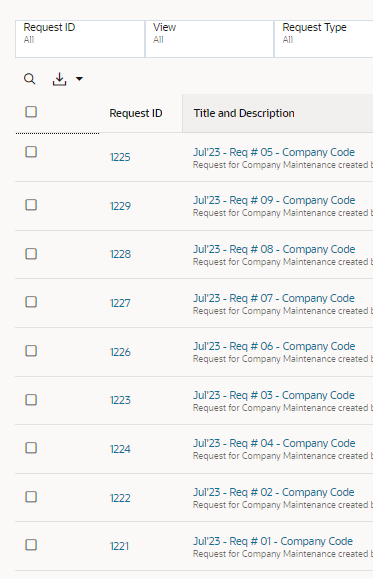
We would like the ability to sort Requests by the columns provided in the request view. 


Use Case and Business Need (Required):

The business would like to be able to sort on the requests that return from a request filter by the request Title and Description (and other available columns) to better allow the review of in process, in flight and completed requests.

A screenshot of a computer

AI-generated content may be incorrect.


Delivered: https://docs.oracle.com/en/cloud/saas/readiness/epm/2024/edm-dec24/24dec-edmcs-wn-f36314.htm


Sort Listing Pages By Selected Column

Several pages in the Enterprise Data Management user interface now support sorting displayed items by a selected column. The table content can be sorted in ascending or descending order. The following pages can be custom sorted by a particular column:

  • Views
  • Request Activity
  • Applications
  • Node Types
  • Hierarchy Sets
  • Node Sets
  • Properties
  • Lookup Sets

Business Benefit: Listing pages in Enterprise Data Management can be custom sorted by a selected column to find particular items of interest.