Showing posts with label Oracle EDMCS. Show all posts

Thursday, January 2, 2025

Flag Policies that are invalid in the Policy Listing Report Download - DELIVERED

Oracle EDM Idea Lab post - DELIVERED

Flag Policies that are invalid in the Policy Listing Report Download


Description (Required):

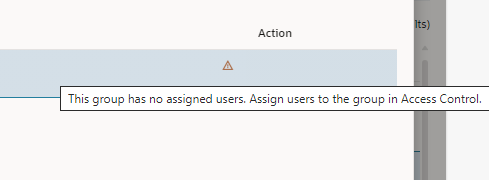
We would like to have the Policy Listing report download updated to show a warning or indicator when a policy has become invalid due to users being removed from the groups assigned.

Use Case and Business Need (Required):

Currently this is only viewable when inspecting a single policy and is typically only identified once a policy has failed. If we can get this in the report, we can see if this were to occur in a single location verses having to inspect every policy.


Enhancement Request / Service Request: 

Update Policy report download to show same warning you see when inspecting an individual policy.


Delivered: https://docs.oracle.com/en/cloud/saas/readiness/epm/2024/edm-dec24/24dec-edmcs-wn-f36289.htm


Column in Policy Listing Report Download to Indicate Validity 

When downloading the Policy Listing report to a file, an additional column is included to identify whether each policy is valid or not. The Valid column provides a True value for valid policies and a False value for invalid policies. An invalid policy may have resulted from a deletion of an assigned user or group, or a metadata object which the policy depended on.

Business Benefit: The Valid column in the Policy Listing report download can be used to determine if there are any invalid policies which need to be modified or disabled to ensure proper request workflow behavior


Tuesday, February 27, 2024

More of my Idea Lab posts realized in EDM 24.03 release

Just wanted to share some of my Idea Lab posts for EDM that Oracle has made available in the 24.03 release. Please take a few minutes to see what Oracle has done and as always, remember to vote and comment on idea lab posts you like as Oracle is listening and responding to the community.


Allow for exclusion of archived objects when creating a template

Ask: We need the ability to exclude archived or draft objects when creating templates.

Use Case and Business Need: When migrating to production, we need to ensure there is no left over work in progress or "dead" objects that cannot be deleted but have been archived. These archived objects will not have been tested and cannot be migrated to production. They must be excluded from the template.

In addition, this feature would allow for the clean up of unwanted archived objects in lower environments as well. By exporting the template without the archived objects and the associated data via exports, the application can be archived and deleted. Then it can be re-created with the template and data exports where the old archived objects will no longer exist.

Oracle Delivered: EXCLUDE ARCHIVED OBJECTS DURING TEMPLATE IMPORT

When importing a template file, you can prevent archived objects in the template from being imported into a target Enterprise Data Management environment if the objects are not already present. An Exclude Archived Objects option is available for template preview and import to control whether archived objects in the template will be created in the target environment. For objects which are depend on an archived object, those dependent objects will also be excluded from the template import if they do not exist in the target environment. In cases where a dependent object would be partially excluded, the object will appear in the template preview and import with a warning message indicating it cannot be imported.

Business Benefit: Archived objects that were created for an application or dimension in a source environment but are not needed in a target environment can be excluded during a template import process to ensure those objects are not migrated.


Need multi-select option for subscription top node selection

Ask: When selecting Included Top Nodes on a subscription filter, we would like the option to be able to select multiple items at once from the hierarchy instead of one at a time.

Use Case and Business Need: The user experience is very clumsy when multiple top nodes have to be configured in a subscription filter. need the ability to display all top nodes defined.

Oracle Delivered: SELECT MULTIPLE TOP NODES FOR A VIEWPOINT SUBSCRIPTION FILTER

When defining an Included Top Nodes filter for a viewpoint subscription, multiple nodes can be selected at the same time rather than having to select each top node separately. In cases where several nodes need to be selected, this can significantly reduce the effort required to configure the filter for the subscription.

Business Benefit: For viewpoint subscriptions which are filtered using many top nodes, the ability to multi-select those top nodes provides an efficient way to configure the subscription filter.


Allow INSERT Orphans from Node Set to associated Hierarchy Set via UX (not request upload)

Ask: Need the ability to INSERT, using the UX node selector, an orphan node in the node set not in the hierarchy set.

Use Case and Business Need: When a node has become an orphan, the ADD function in the UX does not work as it returns the error: A node with the name '****' already exists in node type '****'.

If you select 'INSERT HERE' instead of ADD, the Select a Node prompt will not find the orphan member from the node set.

We would like to have the Node Selector have an option to select from orphan nodes to insert to the hierarchy set without having to create custom list views for every node set.

Oracle Delivered: QUERY ORPHAN NODES FOR HIERARCHY VIEWPOINTS

Viewpoint queries can be used to identify nodes of particular node types that have not been included in the hierarchy set for a viewpoint. An Orphan Nodes query scope is available to determine which nodes have been excluded and may potentially need to be inserted into the viewpoint. Additional filters can be specified for an orphan nodes query to reduce the results to particular orphans of interest. Nodes from orphan query results can be inserted into the hierarchy viewpoint using drag-and-drop or the node selector dialog when in the context of a request.


Business Benefit: Orphan node queries can be used to ensure nodes of specific node types are included in a hierarchy viewpoint for reconciliation purposes. They also provide a way to identify nodes which may have been indirectly removed from a hierarchy and need to be re-inserted for completeness reasons.


Thursday, December 14, 2023

Oracle Idea Lab really does work!!


I wanted to share some recent idea lab posts I had made in the Oracle Cloud Customer connect ideas lab for EDM and show that getting these ideas into the forum, voted on and community comments provided really does help get new features and functionality for us to use.


First and foremost, I want to put out a big THANKS to the EDM product management and development teams for allowing us to provide this important input and even more important fact that you are listening and delivering.


In the recent test release of EDM (23.12) these ideas I had submitted came to life (note there are many others that the community submitted that also come to life).


·      Need to be able to evaluate (test) an expression in the Expression Build

o   Description

§  We need the ability to test out the results of an expression while still in the expression builder.

o   Use Case and Business Need

§  The process of writing an expression (formula) in EDM can be very complex and iterative. In the current user experience, it requires defining the expression, saving it, closing the object the expression is in (validation, property, NT converter, etc) then going to a view/viewpoint and trying it out. 

§  This cycle of setting up the expression, saving and testing it out can recycle as many as 2 dozen times (or more) before the expression is setup correctly.

§  If we had the ability to select a view/viewpoint and node to evaluate the expression against to see the result while still in the Expression Builder, this would make the process extremely efficient and ensure the expression is correct before actually saving it into EDM. 


·      Add Lineage to Transaction Audit report

o   Description

§  We would like to have the request lineage information available for download with the Transaction and Workflow audit reports.

o   Use Case and Business Need

§  Having the lineage in the downloads would allow the report to show how each of the transactions are associated via subscription. This is needed to be able to visualize the metadata movement within the application in EDM prior to publishing to the target ERP and EPM applications. 


·      Need to have audit filter that will include related requests

o   Description

§  Need to have audit filter that will include related requests.

o   Use Case and Business Need

§  As part of normal business we will filter specific requests in the audit using the given filters EDM has. Once we have the set of requests filtered down, we also need to see any request that is related to what has been filtered. 

§  Two use cases:

·      To see the specific requests that generated the items we have filtered to (up stream requests)

·      To see the specific requests that generated from the requests we have filtered (down stream requests)


·      Need to be able to run selected validation on a given viewpoint

o   Description

§  Need to be able to run a selected set of assigned validations on a given viewpoint. 

o   Use Case and Business Need

§  When running validations on a viewpoint we have different data stewards that are responsible for clearing different validations. We need a method to run a single or group of validations associated to a viewpoint so the results only show items for the selected validation(s) and not all.


·      Hide Tiles not used by 'Users'

o   Description

§  There are several tiles exposed to users that could be hidden when their access does not allow them to manage the related objects. 

o   Use Case and Business Need

§  For Non-Owner/Non-Data Manager users, the Applications, Node Types, Hierarchy Sets, Node Sets, Properties, Lookup Sets & Connections tiles should not be exposed.

§  For Data Managers the same applies with the exception of adding back the Applications tile.
 

Saturday, December 2, 2023

 EDM helpful hint – Data Storage and Implied Share identification for Universal Application in EDM.

How to create a dynamic Data Storage property in a Universal Application type in EDM and identify when a node is implied as a share since it has an ancestor that is shared above it in the hierarchy.


One of the challenges I had recently was to identify implied shared nodes in a hierarchy where the application type in EDM was “Universal”.  Since the out of the box logic for Data Storage does not come with or supported for the universal application, my solution required me to create some derived logic mimicking the logic Oracle has provided but not exposed on the Planning and FCC application types.


Steps involved:

1 – Add the PLN.Data Storage property to the node type on my universal application dimension. – This will be where we add the derived logic to mimic the OOB Planning and FCC logic.


2 – Create a new property called Custom.Display_DataStorage and add it to the node type on my universal application dimension – This is used to flag and display where a node is “implied” in the location of the hierarchy as an ancestor has been shared in the hierarchy and the particular node is just displayed in the UI but not actually part of the hierarchy (or export). 


Friday, July 10, 2020

Oracle EDMCS Idea... Allow saved connections to be used in exportDimension EPM Automate command

Allow saved connections to be used in exportDimension EPM Automate command

Description:
In the Feb 2020 Release of EDM there was an updated command added to EPM Automate for EDM called exportDimension. This new command is missing the ability to specify a defined connection for the export. 
We need the ability to specify the saved connection in EDM for this command so that we can send exports to both EPM targets (Consolidations & Planning) along with ERP (FCGL) targets. 
Use Case and Business Need:
The business wants to use a consistent batch scripting tool without the overhead of REST API or OIC build efforts. Using EPM Automate allows for simple batch command line automation from EDM into the supported applications. 
As an Oracle Cloud application, it is expected that simple configuration in needed to integrate from EDM to EPM or FCGL application as these are out of the box "detected application adapters" provided in EDM for EPM and FCGL.
More details:
Having the option in the exportDimension command or a new command called something like exportDimensionWithConnection is a must have to complete the enterprise data governance process from reference data inception through approval and ultimately into the target consuming applications.